

OpenAI understands a fixed set of named moments — events like order_created and items_added. Your job isn’t to use all of them; it’s to map the WooCommerce events that match your funnel and ignore the rest. This guide walks through each one in plain terms, explains the value rule that quietly breaks hand-built tracking, and shows what the plugin sends on its own.
For the wider setup picture first, see the complete WooCommerce tracking guide.
The shopping funnel, mapped
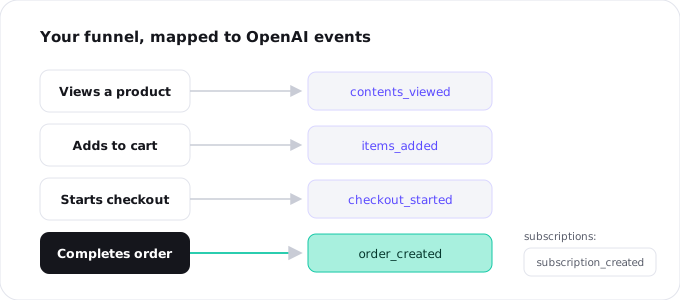
Most of OpenAI’s standard events line up neatly with steps a shopper already takes on your store. Here’s the core funnel:
contents_viewed— a shopper opens a product pageitems_added— they add something to the cartcheckout_started— they begin checkoutorder_created— the purchase completes
That last one, order_created, is the event that matters most: it’s the sale. If you only ever track one thing, track this. The earlier three are upper-funnel signals that help OpenAI understand interest and optimise toward buyers, but the order is the conversion that pays the bills.
Beyond the basic funnel
Depending on what your store sells, a few more events come into play.
Subscriptions and trials
If you use WooCommerce Subscriptions, two events capture recurring revenue: subscription_created when someone starts a paid subscription, and trial_started when they begin a free trial. These let you see whether ChatGPT ads drive not just one-off orders but ongoing customers — which is usually where the real value sits.
Leads and registrations
Not every conversion is a purchase. lead_created fires on a form submission — an enquiry, a quote request, a newsletter signup — which matters for service and B2B stores. registration_completed fires when a new customer account is created, useful for membership sites where the account itself is the first commitment. Form leads get their own treatment in tracking form leads.
The value rule that trips everyone up
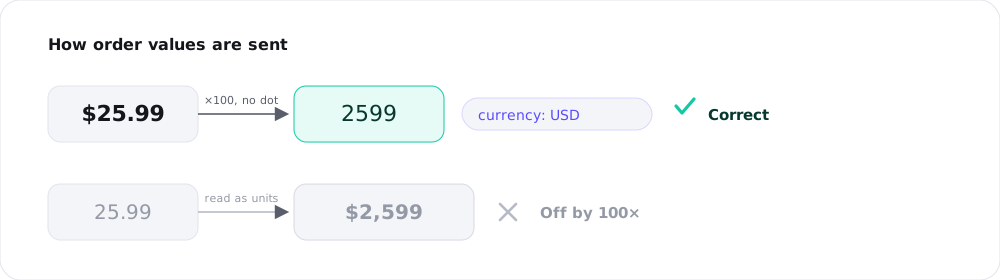
Here’s the detail that breaks more hand-built setups than anything else: monetary values are sent as whole numbers in the currency’s smallest unit.
That means $25.99 is not sent as 25.99 — it’s sent as 2599, the number of cents. €10.00 becomes 1000. And whenever you include an amount, you must also include the currency, so OpenAI knows what those units are.
Get this wrong and your reporting goes sideways in confusing ways: an order worth $25.99 logged as a $2,599 sale, or revenue that’s off by a factor of a hundred. It’s an easy mistake to make in code and a tedious one to catch. The plugin converts WooCommerce order totals to the correct minor units automatically, with the right currency attached — which is the main reason not to wire order_created by hand.
What the plugin fires automatically
With the Pro plugin, you don’t map any of this. It detects the WooCommerce funnel and sends the right event at the right moment: contents_viewed on product pages, items_added on add-to-cart, checkout_started at checkout, and order_created on the order-received page — with the value correctly converted and the currency set. Subscriptions fire subscription_created and trial_started; new accounts fire registration_completed; supported forms fire lead_created.
Each event is sent on both the browser pixel and the Conversions API with a matching ID, so it’s counted once. (Why both routes: pixel vs Conversions API.) If you want this hands-off, that’s the Pro plan; the base connection is free.
Custom events, when you need them
Occasionally a store has a conversion that doesn’t fit any standard name — a “book a demo” click, a specific milestone, an action unique to your business. OpenAI allows a custom event for exactly these cases, identified by a custom event name you choose. Reach for it only when nothing standard fits; using the standard events wherever possible keeps your reporting clean and comparable. (When custom events are deduplicated, the match is on that custom name rather than a standard event name.)
Frequently asked questions
order_created — it’s the completed sale. If you track nothing else, track that, with the correct value and currency.
They’re optional but useful. contents_viewed, items_added, and checkout_started are upper-funnel signals that help OpenAI optimise toward buyers. The order is the conversion; the rest is context.
As a whole number in the smallest currency unit — $25.99 becomes 2599 — and always include the currency. The plugin does this conversion for you automatically.
With WooCommerce Subscriptions, subscription_created fires on a new paid subscription and trial_started on a free trial. The Pro plugin sends these automatically.
Only when no standard event fits your conversion. Prefer standard events for clean, comparable reporting; use custom with a chosen name for the rare action that doesn’t map.