When you set up OpenAI Ads tracking, you’ll meet two things that sound like they do the same job: the OpenAI pixel and the Conversions API. The short version of OpenAI pixel vs Conversions API is that they report the same sales through two different doors — one through the shopper’s browser, one straight from your server — and using both is how you actually measure your campaigns instead of guessing.
This guide explains what each one is, in plain terms, what it’s good and bad at, and why running them together gives you the full picture. If you want the wider overview first, start with the complete WooCommerce tracking guide.
The two doors a conversion can come through
A “conversion” is just an action you care about — usually a completed order. When it happens, OpenAI needs to be told, so it can match the sale back to the ad that earned it. There are two routes for delivering that message.
The browser route is the pixel: a small script on your pages that fires the moment the action happens. The server route is the Conversions API: your store’s own server sending the same message behind the scenes. (“API” simply means two systems talking directly to each other.)
Same message, two messengers. The difference is where each one lives — and that changes everything about what they can and can’t see.
The pixel: fast and detailed, but easily blocked
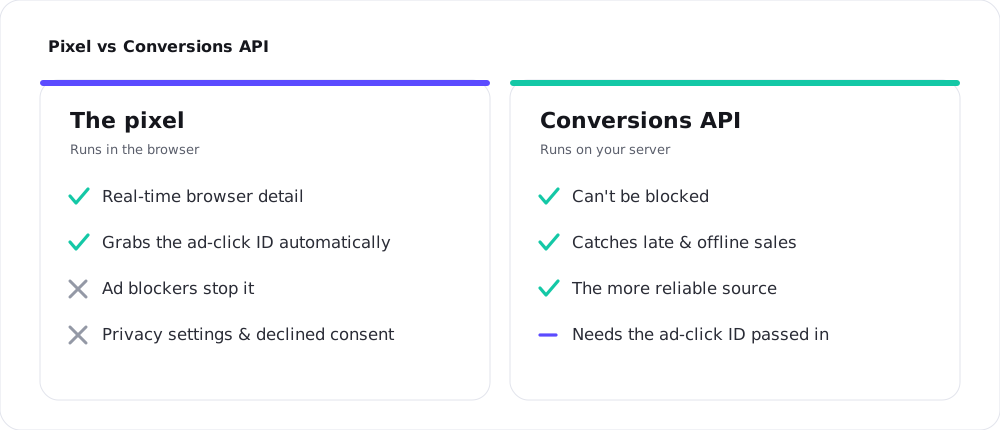
The pixel’s strength is that it sits right where the action happens. It sees the shopper’s journey in real time, and it automatically picks up a small identifier OpenAI attaches when someone arrives from a ChatGPT ad — the thing that lets OpenAI connect “this person clicked our ad” to “this person bought something.” For everyday browsing events, the pixel is quick and granular.
The weakness is that it lives in the shopper’s browser, and the browser is a hostile place for tracking. Ad blockers stop it. Browser privacy features (the kind built into Safari and Firefox) limit it. And anyone who declines marketing cookies never triggers it at all. None of that is a bug — it’s just the modern web. The result is that a pixel-only setup always reports fewer sales than really happened.
The Conversions API: reliable, and sees what the pixel can’t
The Conversions API works from your server, which the shopper’s browser can’t interfere with. Ad blockers and privacy settings don’t touch it. That alone makes it the more dependable of the two — OpenAI itself describes the server route as the more reliable source.
It also reports things the pixel will never see. A payment that clears a few minutes after checkout, an order taken over the phone, a subscription that renews next month — these happen away from the browser, so only your server knows about them. The Conversions API can send them anyway.
The one thing it doesn’t do for free is automatically grab that “came from a ChatGPT ad” identifier, since it isn’t sitting in the browser when the click lands. In a good setup, that identifier is captured once and passed along — which is exactly the kind of plumbing a plugin handles for you.
What each one catches that the other misses
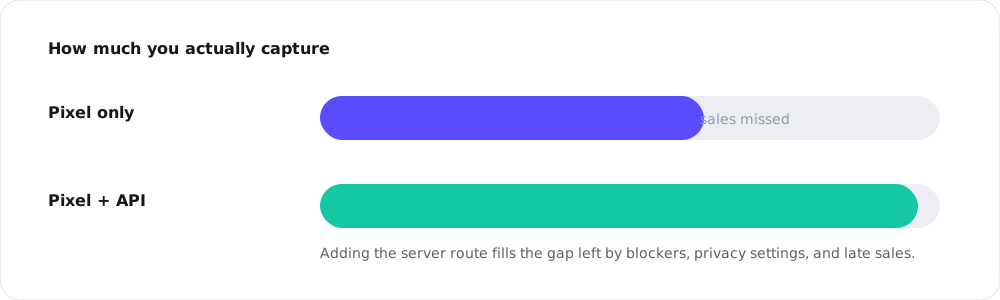
Think of it as coverage. The pixel covers shoppers with tracking-friendly browsers who accept cookies and convert quickly. The server covers everyone else — blocked browsers, declined cookies, and sales that finish later. Each one has a blind spot, and the other fills it.
Run only the pixel and you’re working from a sample: a real number, but smaller than reality, and skewed toward a particular kind of shopper. Add the server and the sample turns into something close to a full count. That’s the whole reason to bother with both.
“Won’t that count every sale twice?”
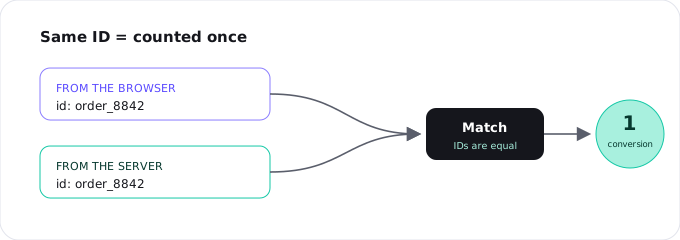
It’s the obvious worry, and the answer is no — as long as both messages carry the same ID. When the pixel and the server both report the same order, they tag it with the same identifier (think of it as the order number). OpenAI sees two messages with a matching ID and understands they’re one sale, so it counts it once. This is called deduplication — a long word for “don’t count the same thing twice.”
The catch is that the two IDs have to match exactly. If the browser sends order_8842 and the server sends something different, OpenAI can’t tell they’re the same sale, and you either double-count or lose the safety net. Keeping those IDs in sync by hand is fiddly; a plugin that owns both sides keeps them identical automatically. You can see the mechanics in the setup guide.
A pattern you may already know
If you’ve run Meta or Google ads, this two-sided approach will feel familiar — it’s the same idea as Meta’s Conversions API or Google’s server-side tagging. Browser tracking gives you detail; server tracking gives you reliability; a shared ID stitches them together. OpenAI didn’t invent a new model here, which is good news: it’s a proven pattern, just applied to a new ad surface inside ChatGPT.
How to run both without the headache
In theory you can wire up both sides yourself — install the pixel, build the server calls, capture the ad identifier, and keep every ID matched. In practice that’s a real maintenance job, and a small mistake quietly costs you data.
The simpler route is a plugin built for WooCommerce. Measurement Pixel for OpenAI Ads fires both the pixel and the Conversions API for every order, passes the ad identifier from browser to server, and keeps the IDs matched so nothing is counted twice — all from a settings page, no code. If you’re weighing your options, the plugin vs GTM vs code comparison lays them out side by side.
Frequently asked questions
It’s more reliable, because the browser can’t block it, and it catches sales the pixel can’t see. But it isn’t a full replacement — the pixel captures real-time browser detail and the ad-click identifier automatically. The strongest setup uses both.
You can, but you’d lose the easy capture of the “came from a ChatGPT ad” identifier and some real-time detail. Most stores run both for the best coverage.
Yes. Both report to the same pixel, so even server-side sending needs your Pixel ID alongside the API key.
Through deduplication: both messages carry the same ID under the same Pixel ID, and OpenAI treats them as one conversion. For custom events, it matches on the custom event name instead.
Conceptually, yes — browser pixel plus server-side API, reconciled by a shared ID. If you’ve set up Meta or Google server-side tracking, OpenAI’s version will feel familiar.