The free Measurement Pixel for OpenAI Ads does the part most people dread: it connects your website to OpenAI and gets the plumbing right. Pro takes it the rest of the way — it automatically fires your actual store events (orders, subscriptions, form leads, registrations) on both the browser and the server, deduplicated, without you touching code. This guide lays out exactly where the line sits, so you can tell which one your store needs.
If you haven’t set anything up yet, the step-by-step setup guide covers installation; this article is about choosing a plan.
What the free version does
Free is not a crippled demo — it’s a working foundation. With the free plugin you can:
- Add the OpenAI pixel to your site (just paste your Pixel ID)
- Turn on the Conversions API so events also send from your server, the more reliable route
- Enable advanced matching, which attaches a scrambled (hashed) email and a few signals to help OpenAI credit the right ad click
- Run a connection test to confirm OpenAI is accepting your events
In other words, free gets both tracking routes wired and verified. What it doesn’t do is automatically know when one of your store events happens. It lays the pipes; it doesn’t yet send the water.
What Pro adds
Pro’s job is to fire the events that actually matter to a shop — automatically, with no code and no developer.
Automatic WooCommerce events
Pro detects and sends the full shopping funnel on its own: contents_viewed when a product is viewed, items_added on add-to-cart, checkout_started at checkout, and order_created when the sale completes. For subscription stores it also fires subscription_created and trial_started. You don’t map anything — install, and the orders start reporting. (More on the events themselves in which WooCommerce events to track.)
Form lead tracking
If your store captures leads, Pro tracks form submissions as lead_created straight out of the box for Contact Form 7, Elementor, and Bricks. That’s the difference between knowing an ad drove a sale and knowing it drove an enquiry. (Covered in depth in tracking form leads.)
Registration tracking
New customer accounts fire registration_completed, so signups from ChatGPT ads show up as conversions too — useful for membership sites and stores where the account is the first commitment.
Every event on both sides, deduplicated
This is the quiet but important one. Pro sends each of those events through both the pixel and the Conversions API, with a matching ID so OpenAI counts it once. You get the reliability of server-side and the detail of the browser on every order — without hand-syncing IDs, which is the part that breaks when people build it themselves. (Why that matters: pixel vs Conversions API.)
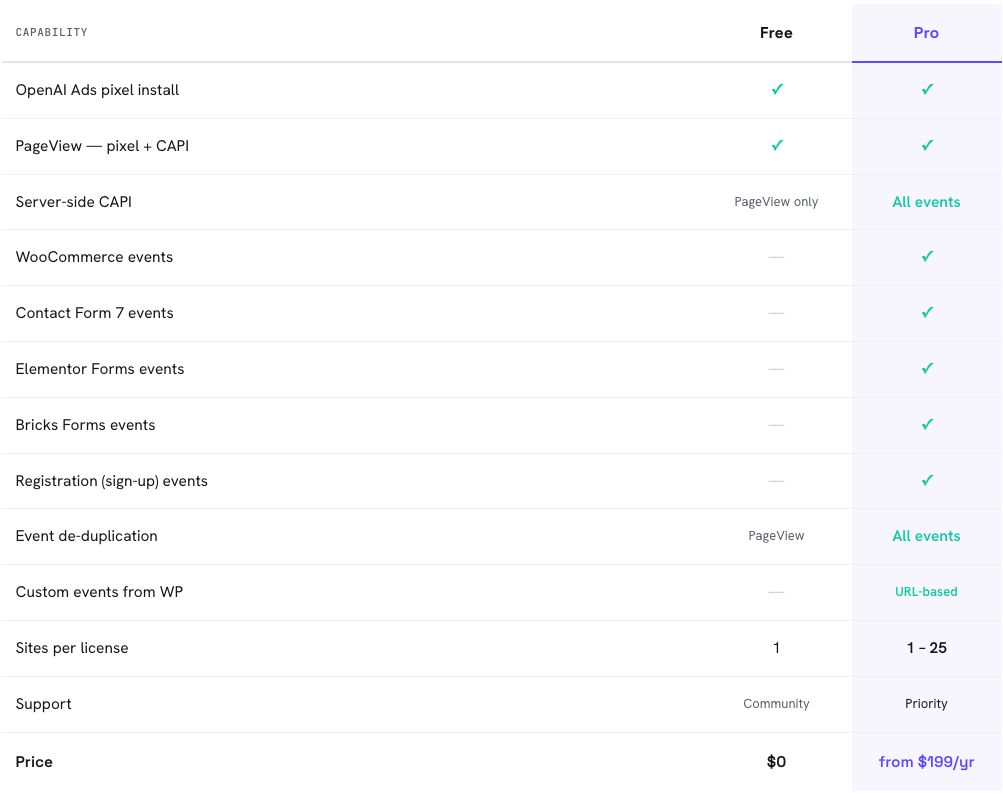
At a glance: free connects and verifies the two routes; Pro automates every real store event across both of them.
Who should stay on free, and who needs Pro
Free is enough if you only need the base pixel connected, you’re comfortable firing your own conversion events in code, or you’re running a simple site where a single manually-placed event is all you’ll ever track.
You want Pro if you run a real WooCommerce store and would rather not maintain tracking code — which is most people. The moment you care about seeing orders (with correct values), subscriptions, form leads, or registrations attributed to ChatGPT ads, and you want them counted reliably on both sides, Pro is doing work you’d otherwise pay a developer to build and babysit.
A simple test: if you’d have to ask a developer to “fire the order event with the right value on the thank-you page, on both the pixel and the server, with matching IDs” — that sentence is what Pro replaces.
The math
Conversion tracking isn’t a vanity feature; it changes how you spend. Without reliable order_created tracking, OpenAI can’t optimise toward buyers and you can’t see your true return, so budget leaks toward clicks that never convert. With it, you can cut what doesn’t work and scale what does.
Put plainly: if Pro costs less than a single order you’d otherwise have miscredited or missed, it has paid for itself. For most stores running paid ChatGPT traffic, that break-even is one or two recovered conversions — the rest is margin. (We’re not your accountant, but the arithmetic is hard to argue with.)
Frequently asked questions
No. Free connects the pixel and the Conversions API and verifies them, but automatic WooCommerce events — including order_created — are a Pro feature. On free you’d fire store events yourself.
The WooCommerce funnel (contents_viewed, items_added, checkout_started, order_created), subscriptions (subscription_created, trial_started), form leads via Contact Form 7, Elementor and Bricks (lead_created), and account creation (registration_completed) — each fired on both the pixel and the Conversions API, deduplicated.
Yes. Those connect your store to OpenAI regardless of plan. Pro adds what gets sent and when, not how you authenticate.
No. Pro sends each event on both sides with a matching ID, and OpenAI counts it once. Just don’t run a second manual tracking setup alongside it.
Yes. Connect and verify on free, then upgrade when you want the store events fired automatically — your Pixel ID and key stay the same.