
Tracking ad conversions means sending data about your visitors, and in many parts of the world you can’t do that until the visitor has agreed. This guide explains, in plain terms, when consent applies to OpenAI Ads, what the WordPress Consent API is, and how to make sure your tracking only fires when it’s allowed to. It’s written for store owners and developers alike — and it isn’t legal advice; if you’re unsure about your obligations, talk to a qualified professional.
For the bigger picture of how the tracking works, see the complete WooCommerce tracking guide.
Why consent matters — and why OpenAI Ads is US-first
When your pixel or server sends a conversion, it can include things like a visitor’s hashed email or IP address. In regions with strict privacy laws — the EU under GDPR and the ePrivacy rules, the UK, and others — you generally need the visitor’s consent for marketing before setting that kind of tracking in motion.
This is also part of why OpenAI Ads launched in the US first and hasn’t opened to the EU yet: the consent and tracking requirements there are stricter, and the platform is working up to them. But “the ad platform isn’t in the EU yet” does not mean “EU visitors don’t have rights.” If people from regulated regions visit your store, your tracking still needs to respect their consent. The safe default is simple: don’t track until the visitor has said yes to marketing.
The WordPress Consent API, in plain terms
Here’s the problem the WordPress Consent API solves. You might have a cookie banner from one plugin and tracking from another. How does the tracking plugin know whether the visitor accepted marketing cookies? Without a shared language, it doesn’t — so it either fires too early (a compliance risk) or never (lost data).
The WordPress Consent API is that shared language. It’s a small, official standard that lets a cookie banner announce the visitor’s choices — “marketing: granted” or “marketing: denied” — in a way any other plugin can read. The banner publishes the decision; the tracking plugin listens for it. Neither needs to know anything about the other beyond this common signal.
In practice it means you can pair a compliant consent banner with your tracking and trust that they’ll coordinate, instead of hard-wiring them together by hand.
How the plugin waits for marketing consent
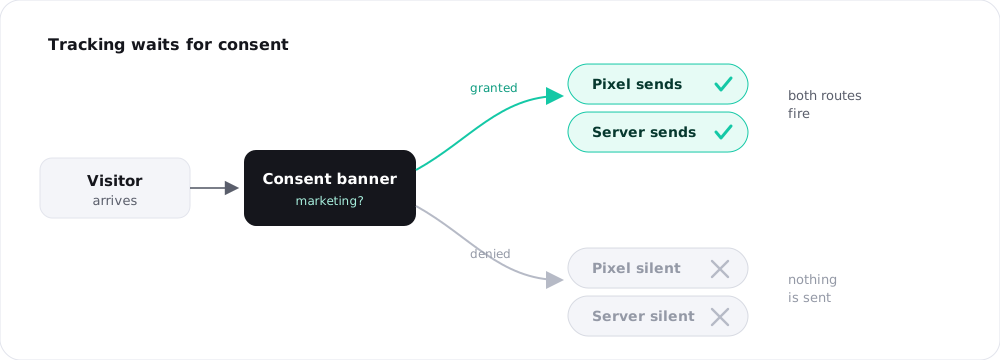
When a WordPress Consent API–compatible cookie banner is active, Measurement Pixel for OpenAI Ads holds back both tracking routes until the visitor grants marketing consent. Nothing fires early.
That “both routes” part matters. It would be easy to gate the browser pixel and forget that the server side also sends data — which would defeat the point. The plugin waits on both: the pixel stays quiet, and the Conversions API doesn’t send, until consent is given. Once the visitor opts in, normal tracking resumes; if they decline, it stays off. You don’t script any of this — it follows the banner’s signal automatically. (How the two routes work: pixel vs Conversions API.)
Advanced matching and personal data
Advanced matching improves attribution by attaching extra signals — a hashed email, a derived ID, the visitor’s IP and browser — so OpenAI can credit the right ad click. It’s privacy-preserving in that the email is scrambled (hashed) before it leaves your server, but it’s still more personal data than a bare event.
The sensible rule: the more personal the data, the more important consent is. Before a visitor has consented, you’d want to send as little as possible — so you can turn advanced matching off to minimise personal data, and rely on it only once marketing consent is in place. The plugin lets you toggle it for exactly this reason. There’s a deeper look in advanced matching.
Working with Cookiebot and other banners
You don’t need a specific banner — you need a Consent API–compatible one. Popular options like Cookiebot support the WordPress Consent API, as do several other major consent plugins. Once such a banner is active and configured to manage the “marketing” category, the tracking plugin picks up its signal with no extra wiring.
A quick sanity check after setup: decline marketing in the banner and confirm no events appear in your OpenAI Ads account; then accept and confirm they start flowing. If declining still produces events, the banner either isn’t Consent API–compatible or isn’t categorising the tracking as marketing — fix that before going live. (Testing steps are in the setup guide.)
A note on EU traffic
Because OpenAI Ads is US-first, most of your ad-driven traffic today will be US-based. But your store can still receive EU visitors from other sources, and the moment any tracking runs for them, consent rules apply. Two practical takeaways: keep a Consent API–compatible banner active so EU visitors are handled correctly whatever the source, and treat the consent-gated setup as the default rather than something to bolt on later. When OpenAI Ads does expand, you’ll already be ready.
Frequently asked questions
The ad platform’s availability doesn’t change your visitors’ rights. If people from regulated regions reach your store and any tracking runs, consent rules still apply. Gating tracking behind marketing consent is the safe default.
A small official standard that lets a cookie banner publish the visitor’s consent choices (such as “marketing: granted”) so other plugins can read them. It’s how your banner and your tracking coordinate without custom code.
Yes. With a compatible banner active, both the browser pixel and the Conversions API wait for marketing consent. Gating only the browser would leave the server sending data, which the plugin avoids.
That’s the cautious approach. Advanced matching sends more personal data (a hashed email and other signals), so minimising it until marketing consent is granted reduces your exposure.
Yes — Cookiebot supports the WordPress Consent API, as do several other major consent plugins. Make sure it’s configured to manage the marketing category, then test by declining and accepting.
Note: this article explains how consent works technically and is not legal advice. For your specific obligations, consult a qualified professional.